
Change a registration, withdraw one, read them back
The workshop from tutorial 02 is running. Somebody wants to move from the morning to the afternoon session, somebody else cannot come at all, and the organiser wants the roster on the event page. All three are the same idea: a record you can find again.
- The scenario
- The registration Sheet from tutorial 02 already has rows in it. Now those rows need to change without anybody editing the spreadsheet by hand.
- What you end up with
- An Update workflow, a Delete workflow, and a read key your own page can use to show the roster.
- You need
- The existing registration workflow and its Sheet
- A Pro workspace — Update, Delete and Record Fetch are all Pro
- Somewhere to send each attendee their own record reference
-
Your managed Sheet, column A
Meet webtzm_id, the handle everything else uses
Every row Webtzm writes starts with
webtzm_idin column A. It is how an Update finds the right row again, and how a Delete finds the right row to remove. Nothing else identifies a record — not the email address, not the name.So the attendee needs their own reference. The natural place to give it to them is the receipt you already send — include the record reference in the message, and the link they follow to change their booking carries it.
-
Workspace › Update
Build the Update workflow
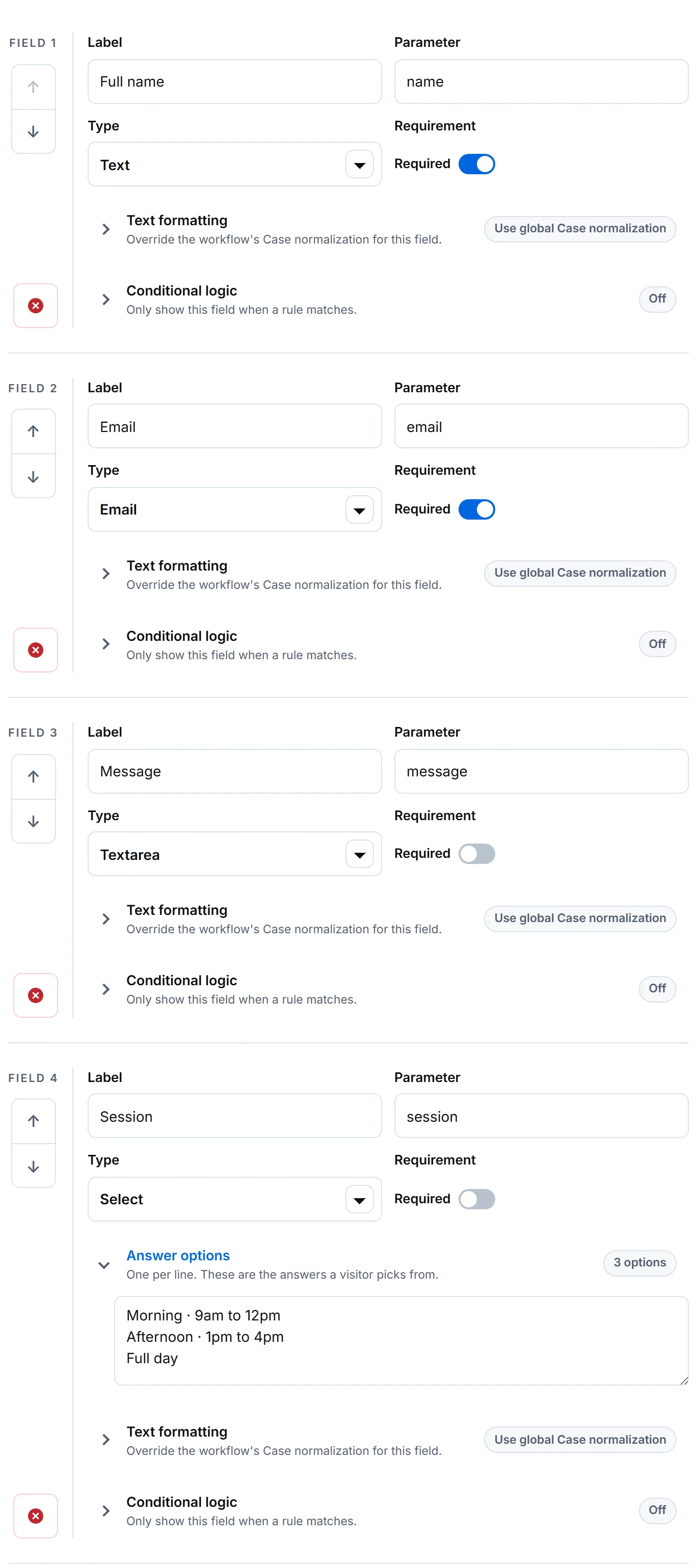
Update is its own entry in the rail, beside Create. Build it with the fields an attendee is allowed to change — not every field on the original form.
 Open full size
Only include what may change. A field you leave out cannot be altered through this form, which is the simplest access control there is. The generated code adds one field you did not: a required Record ID input, emitted visibly so the published form works as generated.
Generated Update form HTML — note the webtzm_id field at the top <form class="wtzm-form" action="https://webtzm.com/submit" method="post" data-webtzm-form="YOUR_FORM_ID" data-wtzm-enhancement="client" data-wtzm-format-events="submit" data-wtzm-validation-style="red" data-wtzm-block-invalid="true" data-wtzm-validation-messages="true" data-wtzm-status-feedback="true" data-wtzm-lock-submit="true" data-wtzm-text-trim="true" data-wtzm-text-clean="true" data-wtzm-text-truncate="false" data-wtzm-text-max-chars="50000" data-wtzm-capture-referrer="false" data-wtzm-capture-utm="false" data-wtzm-capture-locale="false" data-wtzm-timestamp-zone="UTC"> <div data-wtzm-field="webtzm_id"> <label for="webtzm_id">Record ID <span class="wtzm-required" aria-hidden="true">*</span></label> <input id="webtzm_id" type="text" name="webtzm_id" placeholder="The webtzm_id of the row to update" required> </div> <div data-wtzm-field="session"> <label for="session">Session</label> <select id="session" name="session"> <option value="">Select Session</option> <option value="Morning · 9am to 12pm">Morning · 9am to 12pm</option> <option value="Afternoon · 1pm to 4pm">Afternoon · 1pm to 4pm</option> <option value="Full day">Full day</option> </select> </div> <div data-wtzm-field="dietary_notes"> <label for="dietary_notes">Dietary notes</label> <textarea id="dietary_notes" name="dietary_notes" rows="4" placeholder="Enter dietary notes"></textarea> </div> <p data-wtzm-send-status role="status" aria-live="polite"></p> <button class="wtzm-submit" type="submit">Submit form</button> </form> -
Know exactly what an update touches
An update changes only the answers it receives filled in. A field the visitor leaves blank keeps whatever the row already holds, so somebody who answers one question does not empty the rest.
The attendee submits The stored row session= Afternoon,dietary_notesblanksessionchanges; the existing dietary note is keptBoth fields filled in Both change Both left blank Nothing changes Your own code sends nullfordietary_notesThe cell is emptied, and stays empty -
Workspace › Delete
Build the Delete workflow
Delete removes the managed Sheet row. It needs only the record reference, so build it with no fields at all and let the generated markup supply the one input it requires.
Generated Delete form HTML — the same shape, one word different <form class="wtzm-form" action="https://webtzm.com/submit" method="post" data-webtzm-form="YOUR_FORM_ID" data-wtzm-enhancement="client" data-wtzm-format-events="submit" data-wtzm-validation-style="red" data-wtzm-block-invalid="true" data-wtzm-validation-messages="true" data-wtzm-status-feedback="true" data-wtzm-lock-submit="true" data-wtzm-text-trim="true" data-wtzm-text-clean="true" data-wtzm-text-truncate="false" data-wtzm-text-max-chars="50000" data-wtzm-capture-referrer="false" data-wtzm-capture-utm="false" data-wtzm-capture-locale="false" data-wtzm-timestamp-zone="UTC"> <div data-wtzm-field="webtzm_id"> <label for="webtzm_id">Record ID <span class="wtzm-required" aria-hidden="true">*</span></label> <input id="webtzm_id" type="text" name="webtzm_id" placeholder="The webtzm_id of the row to delete" required> </div> <p data-wtzm-send-status role="status" aria-live="polite"></p> <button class="wtzm-submit" type="submit">Submit form</button> </form> -
Setup › Output
Or hand each record to another system as JSON
There is a second way out of Webtzm that involves no spreadsheet at all. Choosing JSON file as the workflow's output writes one versioned UTF-8 record per submission into a Drive folder — a handoff for an automation, an import, or an archive that has to outlive the tool that made it.
One delivered JSON record — read back out of Drive, unedited { "schema_version": "webtzm.submission.v1", "submission": { "id": "3a0c3d0a-e9ac-4b3b-a963-52333ed0d79e", "accepted_at": "2026-09-07T09:50:53.268Z", "synced_at": "2026-09-07T09:51:30.548Z", "timezone": "UTC", "timestamp_format": "iso", "fields": { "name": "Daniel Okafor", "email": "daniel.okafor@example.com", "session": "Afternoon · 1pm to 4pm" } } }This is the opposite trade from a Sheet: nothing is readable at a glance, and everything is readable by a program.
-
Workspace › Manage › Setup
Let your own page read the roster back
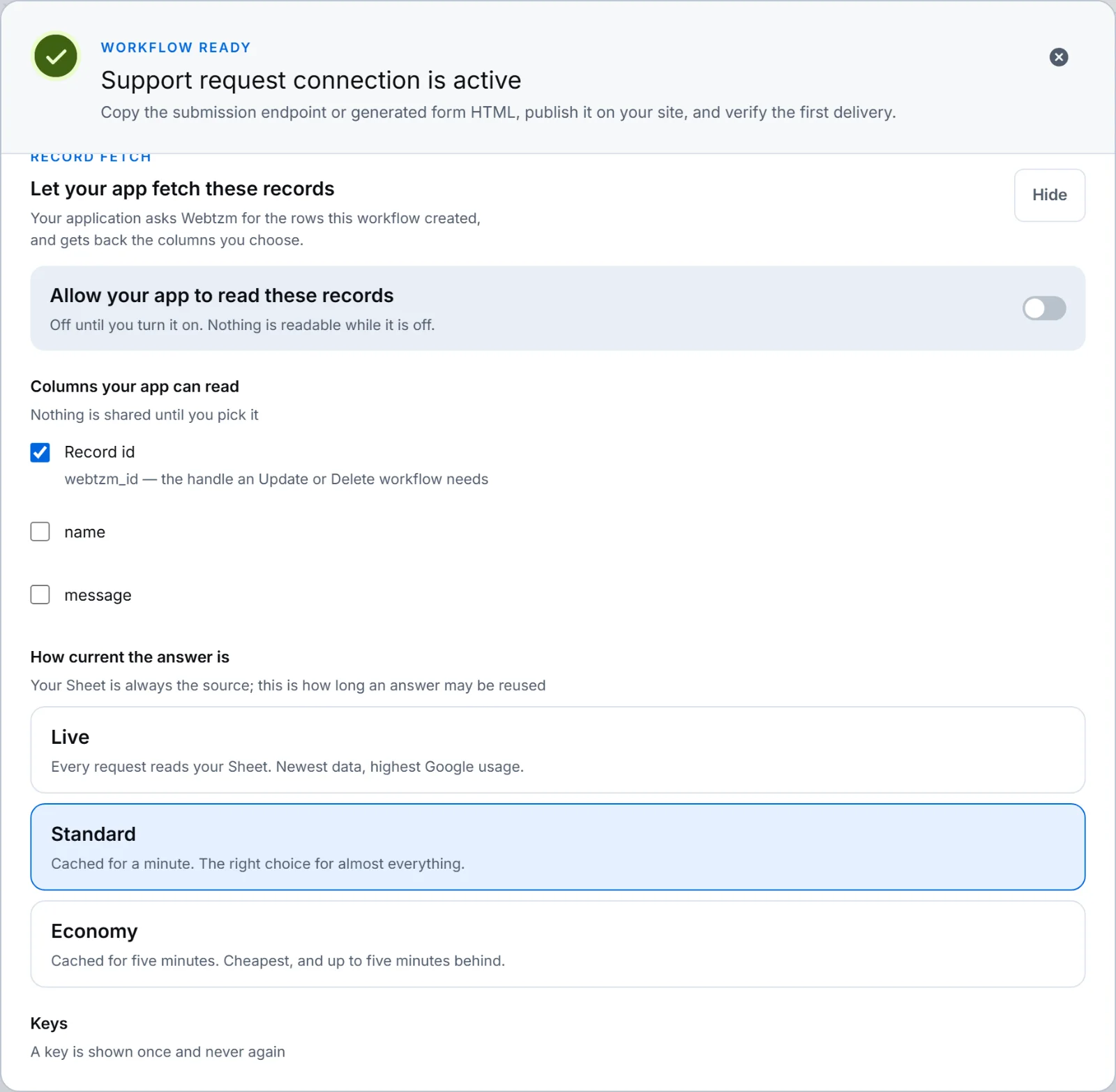
Create, Update and Delete all describe what a submission does to a Sheet. Fetch is the other direction: your application asks Webtzm for the rows this workflow created, and gets them back as JSON.
 Open full size
Nothing is readable until you pick it. Removing a column takes effect immediately. - Keep Record id readable when your page will later offer an update or a withdrawal — that is the handle those need.
- Do not share a column just because it exists. An attendee's dietary note has no business on a public roster.
- Live, Standard and Economy decide how current the answer has to be: every request, one minute, or five. Standard is right for almost everything.
Reading the records from your own server — the key goes in a header, never in a URL curl -H "Authorization: Bearer YOUR_SERVER_KEY" \ "https://webtzm.com/fetch/YOUR_FORM_ID?limit=50"Fetch never writes. Rows change only through a submission, and the Sheet is always the source — a row somebody edited by hand appears in every freshness setting.
The loop, closed
The four operations fit together as one cycle, and webtzm_id is the thread through all of them.
| Operation | Direction | Needs the record reference |
|---|---|---|
| Create | Form → new Sheet row | No — it produces one |
| Fetch | Sheet rows → your application | No — it returns them |
| Update | Form → existing row | Yes |
| Delete | Form → row removed | Yes |
Fetch reads only Sheets that Webtzm created for the workflow. A spreadsheet you supplied by hand cannot be read back, and the panel says so rather than offering a control that would fail later.